

Importing elastic table key error | Oracle Series
Issue
Upon importing a solution containing an elastic table, the following error is thrown:

Solution “xyz” failed to import: The schema name KeyForNoSqlEntityWithPKPartitionId for type EntityKey is invalid or missing.Custom attribute, entity, entitykey, option set and relationship names must start with a valid customization prefix.The prefix for a solution component should match the prefix that is specified for the publisher of the solution.
Investigation
I extracted the customizations.xml file, and then prefixed the key with the publisher’s prefix. That didn’t work, complaining that the key already existed!
Solution
As a practical workaround, consider the following steps until a permanent fix is provided by Microsoft:
- Extract the
customizations.xmlfile from the solution ZIP file - Find the key
KeyForNoSqlEntityWithPKPartitionIdand remove the whole XML entry (shown below) - Save the file
- Add to the solution ZIP file again
- Import
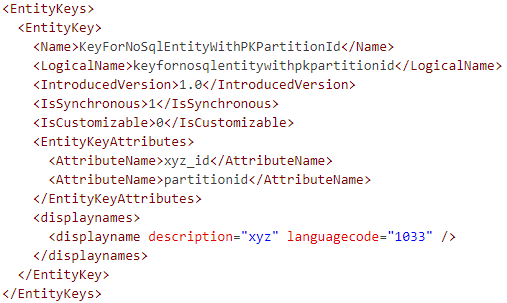
          <EntityKeys>
            <EntityKey>
              <Name>KeyForNoSqlEntityWithPKPartitionId</Name>
              <LogicalName>keyfornosqlentitywithpkpartitionid</LogicalName>
              <IntroducedVersion>1.0</IntroducedVersion>
              <IsSynchronous>1</IsSynchronous>
              <IsCustomizable>0</IsCustomizable>
              <EntityKeyAttributes>
                <AttributeName>xyz_id</AttributeName>
                <AttributeName>partitionid</AttributeName>
              </EntityKeyAttributes>
              <displaynames>
                <displayname description="xyz" languagecode="1033" />
              </displaynames>
            </EntityKey>
          </EntityKeys>
Dataverse creates the key anyway, although it’s missing from the solution.

















Hi, correct solution deployment work, but with next deployment where this is part of XML is failing. I don’t think this is a good solution to modify XML all the time
Hello, Naglowska,
Welcome to my blog.
Indeed, it’s not a good solution. We can only hope Microsoft fixes the issue soon.